"We cannot see your data." It's a claim that shows up on every privacy-focused product page, and it's also the claim that is most often wrong. In most cases it really means "we promise not to look" — which is a policy, not a guarantee.
Zero-knowledge architecture is what makes that statement factual. It is a specific technical design in which the service operator has no cryptographic ability to read user data, even if they wanted to, even if their servers were seized, even if their staff were compromised. In this article we unpack exactly what that means, how it works in practice, and how Schweizerform implements it for form submissions.
Who this article is for
This is a technical explainer aimed at developers, data protection officers, security engineers, and informed decision-makers. You do not need to be a cryptographer, but you will come away with a clear mental model of how zero-knowledge forms actually work.
What "Zero-Knowledge" Actually Means
In cryptography, "zero-knowledge" has a precise academic definition tied to zero-knowledge proofs. In the security-product world, the term is used more broadly to describe a system in which:
- All encryption and decryption happens on the user's device, never on the server
- The keys required to decrypt user data never reach the server in a usable form
- The server stores only ciphertext and cannot derive, guess, or recover the plaintext
- Trust in the operator is not required — the architecture is provable rather than promised
The opposite of zero-knowledge is a trust-based system where the server holds the keys and promises to behave responsibly. Most mainstream SaaS is built this way. It's not bad engineering — it's just a different trust model. Zero-knowledge is the model you choose when the data is too sensitive for any promise to be enough.
Not all "end-to-end encrypted" products are zero-knowledge
A system can use E2EE between users but still rely on server-held keys for backups, password resets, or admin access. Those are legitimate product choices — but they break the zero-knowledge property. Always read past the marketing line to the key management description.
The Hard Problem Zero-Knowledge Has to Solve
The obvious question: if the server holds no keys, how do users log in, share forms, decrypt submissions across devices, and recover from a forgotten password? This is the real design challenge. Anyone can build a system that is secure but unusable — the craft is building one that is secure AND usable.
Every zero-knowledge system converges on a handful of core cryptographic primitives to solve this:
| Primitive | Role |
|---|---|
| Password-based key derivation (PBKDF2, Argon2, scrypt) | Turns a user-memorable secret into a strong cryptographic key |
| Symmetric encryption (AES-256-GCM) | Fast, authenticated encryption for payloads and file attachments |
| Asymmetric encryption (RSA-OAEP or ECDH) | Lets others encrypt to you without sharing a secret — key exchange |
| Authenticated Additional Data (AAD) | Binds ciphertext to its context so it cannot be moved or replayed |
| Cryptographically random key generation | Produces keys no one can guess or predict — including the server |
How Schweizerform Puts It Together
Schweizerform is a form platform, so the specific design question is: how do we let someone create a form, share a public link, accept encrypted submissions from anyone on the internet, and allow only the form owner to read them — all without the server ever holding a decryptable copy?
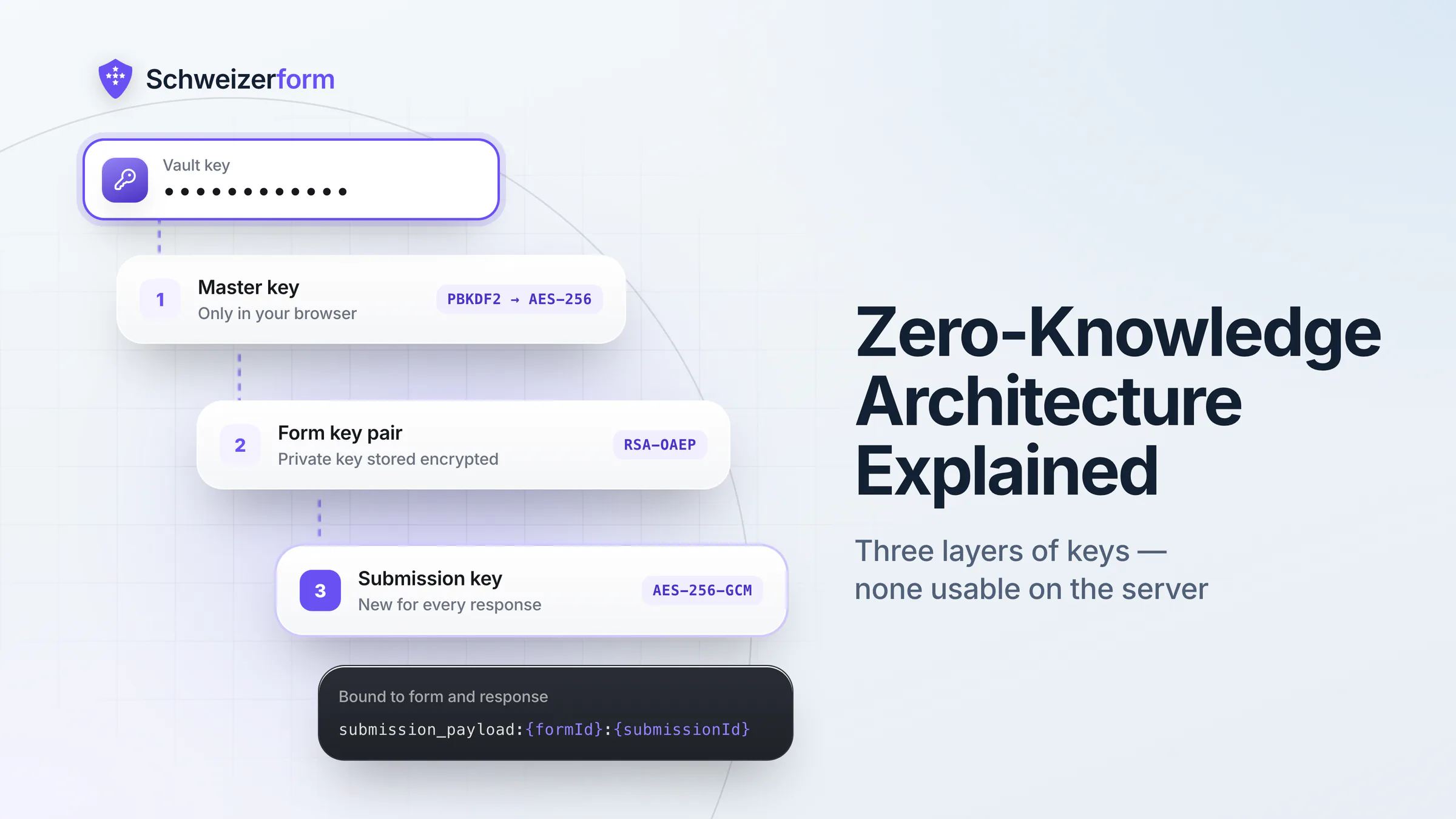
The answer involves three layers of keys: a master key derived from your vault key, a form-level RSA key pair, and a one-time AES key per submission. Let's walk through each.
Layer 1 — Your Master Key
When you sign up for Schweizerform, you create a vault key. This is not a regular password — it is the only thing that opens the vault your submissions live in. It never touches our servers, we never see it, and we cannot reset it. It cannot be recovered if lost, because the security guarantees depend on exactly that property: a key only you ever hold. In your browser, the vault key is fed into a key-derivation function (PBKDF2 with a high iteration count and a per-user salt) to produce a master AES-256 key.
The master key exists only in the browser's memory. It never touches disk in plaintext. It never leaves the device. It is what unwraps everything else.
Layer 2 — Your Form Key Pair
When you create a form, the browser generates an RSA-OAEP key pair. The public key is uploaded to our servers and included when the public form is rendered — this is how respondents will encrypt data to you. The private key is immediately encrypted with your master key and stored on our servers as ciphertext. We store the encrypted private key, but we cannot decrypt it.
Because the public key is, well, public, anyone who opens the form can use it to encrypt a submission. But only someone with your vault key can derive the master key, unwrap the private key, and open the vault to read the submission. The server is cryptographically shut out.
Layer 3 — A Unique Key Per Submission
RSA is powerful but slow, and its ciphertext length is bounded by the key size. So we don't encrypt the form answers directly with RSA. Instead, when a respondent submits:
- The browser generates a fresh AES-256-GCM key — unique to this submission
- All answers (and file attachments) are encrypted with that AES key, client-side
- The AES key itself is then encrypted with the form's RSA public key
- Both the encrypted answers and the encrypted AES key are sent to the server
This pattern — a symmetric key protected by an asymmetric key — is the standard hybrid encryption model and is used by TLS, PGP, and essentially every serious system. It combines the speed of AES with the key-exchange properties of RSA.
The Role of Authenticated Additional Data (AAD)
AES-GCM is not just encryption — it's authenticated encryption. It produces a tag that the decryptor checks to confirm the ciphertext has not been modified. GCM also supports Additional Authenticated Data: extra context that is not encrypted but is bound to the ciphertext. If any of that context changes, decryption fails.
Schweizerform uses AAD to bind each submission to its specific form and submission ID. The AAD format is:
submission_payload:{formId}:{submissionId}This closes a subtle attack class: even if an attacker somehow obtained an encrypted submission blob, they couldn't replay it against a different form, or swap submission records in the database, without the decryption failing on the owner's side. The ciphertext is welded to its context.
Why this matters
Without AAD, a compromised database could be silently reshuffled — submission A could be labelled as belonging to form B — and the owner would be none the wiser. With AAD, the cryptography refuses to decrypt mismatched records.
The Full Round Trip, End to End
- 1
Form creation (owner's browser)
Master key derived from vault key. RSA key pair generated. Public key uploaded, private key wrapped with master key and uploaded as ciphertext.
- 2
Form publication (server)
Server stores only the encrypted private key and the public key. It cannot decrypt anything on its own.
- 3
Respondent opens form (respondent's browser)
Public form page fetches the form's public RSA key along with the question schema. No account needed for the respondent.
- 4
Respondent submits (respondent's browser)
Browser generates a per-submission AES-256-GCM key, encrypts answers and file attachments with it, wraps the AES key with the form's public RSA key, and attaches AAD binding to formId and submissionId.
- 5
Server receives submission
Stores only: encrypted answer payload, encrypted AES key, IV, and submission metadata. Has no means to decrypt any of it. File attachments are stored with randomised names.
- 6
Owner views submissions (owner's browser)
Enters vault key → derives master key → fetches encrypted private key and unwraps it → fetches submission → decrypts AES key with private key → decrypts answers with AES key and validates AAD → renders in UI.
At every step where plaintext exists, it exists in a browser. At every step where the server touches the data, the data is ciphertext. That is the entire definition of zero-knowledge for this use case.
What This Protects Against — Concretely
| Threat | Outcome in a plain-text SaaS | Outcome with zero-knowledge |
|---|---|---|
| Server breach (stolen DB dump) | All submissions leaked in readable form | Attacker has ciphertext only; no decryption path |
| Malicious or compromised employee | Insider can read any submission | Insider has no key, cannot decrypt |
| Government subpoena to the provider | Provider must hand over plain data | Provider can only hand over encrypted blobs |
| Backup exfiltration | Backups are readable | Backups are ciphertext |
| Misconfigured API / IDOR bug | Arbitrary cross-tenant read | Cross-tenant read still yields only ciphertext |
Being Honest About What Zero-Knowledge Does Not Solve
Zero-knowledge is a powerful layer — but it is not a silver bullet. A well-informed user deserves an honest account of its limits:
- It does not protect the respondent's device — if the browser is compromised, plaintext is exposed at the source
- It does not protect against a malicious client-side code push — which is why code integrity, CSP, and subresource integrity matter
- It does not encrypt metadata like timestamps, submission counts, or question structure — those are necessary for the app to function
- It does not survive losing your vault key — because the key never reaches us, we cannot reset it; recovery requires a shared recovery key held by another trusted party, which we support, but you must set up in advance
- It does not substitute for strong transport security, proper authentication, or secure server operations — it complements them
Zero-knowledge is not a replacement for good security engineering — it is what good security engineering produces when the threat model includes the operator itself.
How to Verify Zero-Knowledge Claims Yourself
You don't have to take our word for it. Open your browser's developer tools on a Schweizerform submission page. Watch the network tab as you submit. Look at the payload leaving your device. You will see:
- A hex-encoded encrypted blob for the answer payload — no readable field values
- A wrapped AES key — shorter, also ciphertext
- An IV and AAD binding — metadata necessary to decrypt, but not the data itself
You will not see the answers in plaintext anywhere in the request. That is the check. A system that fails this test is not zero-knowledge, regardless of its marketing claims.
What zero-knowledge costs, and what it buys
Zero-knowledge is not a feature bullet — it is a design principle that forces difficult engineering choices. Everything that feels "easy" in a conventional SaaS (admin data access, password recovery that restores data, server-side full-text search over user content) has to be rethought or rebuilt on different foundations.
But for sensitive form data — patient histories, legal intake, whistleblower reports, financial disclosures — that effort is the entire point. The goal is not to be trusted with the data; the goal is to make the question of trust irrelevant. When the server physically cannot read what it stores, the entire category of operator-side threats disappears.
Schweizerform is zero-knowledge by default on every plan, including the free tier. No configuration needed — the architecture applies automatically to every form and every submission.
Disclaimer: This article is general information, not legal, regulatory, or compliance advice. Technical descriptions reflect the Schweizerform architecture at the time of writing; implementation details may evolve. Cryptographic concepts and standards referenced are described at a conceptual level and are not a substitute for a formal security review. For specific situations, consult a qualified security or compliance professional.