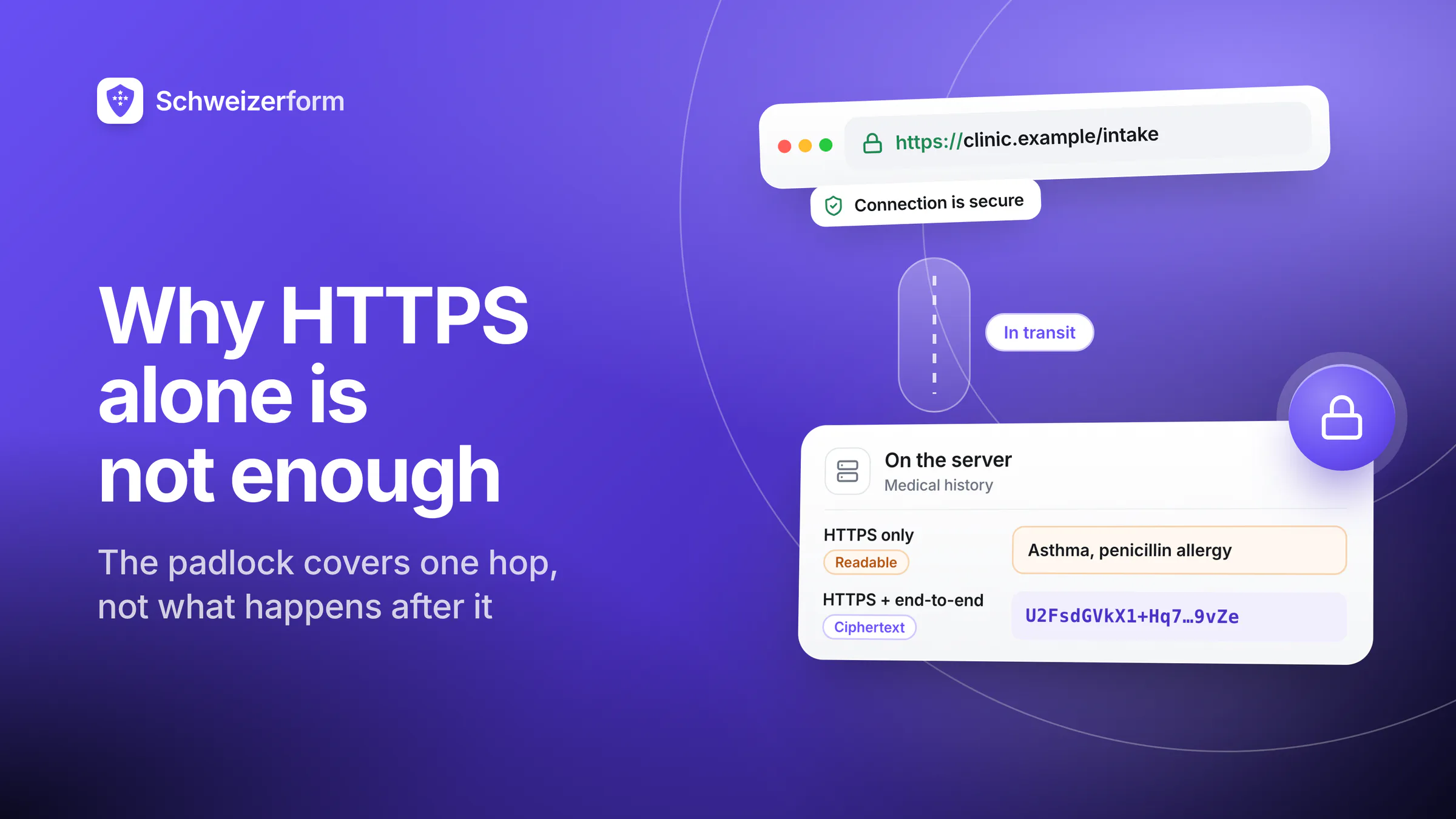
Open almost any privacy page on almost any SaaS product and you will read a sentence close to this one: 'All data is transmitted securely over HTTPS'. It is true. It is also, on its own, a remarkably weak claim about the security of anything sensitive your users submit.
HTTPS is important. It solves one specific problem exceptionally well: it stops an attacker sitting between the user and the server from reading or tampering with the traffic on the way. But that problem is only the first few hundred milliseconds in the life of a form submission. Everything that happens afterwards — storage, backups, analytics, vendor access, subpoenas, breaches — is outside what HTTPS protects. This article walks through exactly where the line is.
Who this is for
Anyone making decisions about online forms that handle sensitive data — product owners, security leads, privacy officers, practitioners, journalists, or the curious person who wants to understand what the browser padlock really promises.
What HTTPS Actually Does
HTTPS is 'HTTP over TLS'. TLS — Transport Layer Security — wraps a normal web connection in an encrypted tunnel between the user's browser and the server on the other end. Inside that tunnel, three properties hold:
- Confidentiality on the wire: someone who captures packets between the user and the server sees encrypted bytes, not readable form fields
- Integrity: the traffic cannot be modified in transit without detection
- Server authentication: the browser checks, via certificates signed by trusted Certificate Authorities, that it is actually talking to the server named in the URL
That is a genuine achievement. Before HTTPS became the default in the early 2010s, coffee-shop Wi-Fi and coffee-shop adversaries routinely plucked passwords out of the air. That era is effectively over. The padlock means 'nobody between your device and this server read or changed this request'. It does not mean anything more than that.
Everything HTTPS Does Not Do
Here is what stops being HTTPS's problem the moment the request arrives at the server. Pick the ones that matter for your use case.
1. The server can read everything
TLS terminates at the server. The moment your form submission lands there, it is in plain text. The application that receives it, the log line that records it, the database that stores it, the analytics pipeline that processes it, the support tool that helps the operator debug it — all of those see the content in readable form. HTTPS adds no protection against anything that happens after the tunnel ends.
2. The form vendor's staff can read everything
If you built the form yourself on your own infrastructure, 'the server' is you and your engineers. If you used a third-party form tool — Google Forms, Typeform, JotForm, and so on — 'the server' belongs to that vendor. Their staff with production access, their on-call engineers, their support agents looking at a customer ticket, their analytics team inspecting usage patterns: all of those people can potentially read the plain-text content of submissions. HTTPS does not change that.
3. Backups and caches are not protected
Once a submission is stored, it typically lives on in places you may not have thought about: database backups taken every night, snapshots of storage volumes, replicas in other cloud regions, CDN caches for uploaded attachments, log-aggregation systems, incident-response records. 'Encryption at rest' helps here, but only against the narrow threat of someone physically stealing a drive. It does not hide the data from the provider's own systems, and backups taken before encryption-at-rest was configured are still vulnerable.
4. Subpoenas, warrants and data-access requests
When a court, regulator, or law-enforcement authority serves a valid order on a form vendor, the vendor produces what it has. If what it has is plain-text form submissions in its database, that is what they hand over. Importantly, the original submitter is typically not informed when this happens — vendors may be under a legal obligation not to tell them. HTTPS is completely orthogonal to this: the data travelled in an encrypted tunnel, but it arrived in a readable form, and that is what gets produced.
5. Breaches and misconfigurations
The depressing modal way a company learns its form data was exposed is not a clever cryptographic attack on TLS; it is a misconfigured S3 bucket, a leaked database backup, a credential stolen from an engineer's laptop, a supply-chain compromise of a library, or a subcontractor who stored a copy somewhere they should not have. In every one of these cases, the data was protected by HTTPS in transit and then sat in plain text somewhere the attacker eventually reached.
6. Malicious or coerced insiders
HTTPS does not protect against someone inside the vendor with legitimate access who decides to read, copy, or sell customer data. Controls against this (role-based access, audit logs, background checks) are important, but they are organisational and procedural, not cryptographic. Zero-knowledge architectures, by contrast, make this threat impossible rather than merely disincentivised: the vendor's staff cannot read what the vendor's systems never saw in readable form.
7. Third-party scripts and front-end compromises
HTTPS protects the channel between the browser and the form's server. It does nothing about the dozen or so third-party scripts modern web pages load — analytics, A/B testing, session replay, tag managers, marketing pixels. Any of those, if compromised or misconfigured, can read form fields before they are submitted, entirely inside the HTTPS connection. Session-replay tools in particular have been caught capturing and storing plain-text form content, including passwords and medical data, through exactly this mechanism.
The summary
HTTPS protects the data in flight between user and server. It does not protect the data once it arrives, does not hide it from the vendor running the server, does not stop a subpoena or a breach from exposing it, and does not stop scripts running in the user's own browser from reading it. Everything interesting about form-data security happens after the HTTPS tunnel ends.
Where End-to-End Encryption Changes the Picture
End-to-end encryption (E2EE) — the property that only the intended recipient, not the transport or the platform, can read the content — is a different category of protection. For a form, it typically means: the user's browser encrypts the submission against a public key the vendor does not hold the private key for, and only the form owner, using a key they control, can decrypt.
The difference against each of the HTTPS limits above:
| Threat | HTTPS only | HTTPS + E2EE |
|---|---|---|
| Attacker on the network | Blocked | Blocked |
| Server reading submission | Reads plain text | Sees ciphertext only |
| Form-vendor staff | Can read | Cannot read |
| Database / backup leak | Exposes plain text | Exposes ciphertext; unreadable |
| Subpoena on the vendor | Plain text produced | Ciphertext only; useless without key |
| Vendor breach | Plain text exposed | Ciphertext exposed |
| Malicious insider at vendor | Can read | Cannot read |
| Third-party script on form page | Can still read fields pre-submit | Still a risk — E2EE does not fix this |
Notice the last row. End-to-end encryption protects the submission after it leaves the user's browser. It does not protect against hostile code running inside that browser. A disciplined form vendor that is serious about security will minimise third-party scripts on the form page, use a strict Content Security Policy, and avoid session-replay tools on pages that handle sensitive input. HTTPS + E2EE + a clean front end together is the combination that actually holds up.
When HTTPS On Its Own Is Fine
Not every form needs end-to-end encryption. The exercise is not 'paranoia for everything'; it is matching the control to the sensitivity of the data. HTTPS on its own is usually sufficient for:
- Contact forms where the content is essentially public (name, email, general inquiry)
- Event RSVPs, feedback surveys, newsletter signups
- Low-stakes support requests that do not include account credentials or sensitive personal data
- Marketing-research forms where the entity collecting the data is the intended audience and there is no regulated sensitivity classification
For those, HTTPS plus a reputable vendor, a clear retention policy, and the usual server-side hygiene is the right answer. Reaching for zero-knowledge crypto would be overkill. The point of this article is not that HTTPS is bad — it is excellent at what it does — but that HTTPS alone is not what you should be relying on when the submission contains a medical history, a KYC file, a legal intake, a whistleblower report, or any other content where the impact of exposure is serious.
Practical Checklist for Evaluating a Form Channel
- 1
Classify the data the form collects
Is it public-ish, regular personal data, or sensitive (health, financial detail, criminal, minors, etc.)? The controls below scale with this.
- 2
Confirm HTTPS is enforced, with modern TLS
TLS 1.2 minimum, preferably TLS 1.3. HSTS enabled. No mixed-content warnings. If this is not the case, nothing else matters yet.
- 3
Ask who can read the content on the server side
If it is a third-party vendor, their answer should distinguish between 'we the company' and 'our staff'. A zero-knowledge vendor answers 'no staff can read this'.
- 4
Audit the form page's third-party scripts
Inspect the page: how many external scripts load, from whom, doing what? For sensitive forms, the answer should be 'as few as possible and no session-replay'.
- 5
Check encryption at rest and backups
Ask about disk-level encryption, backup encryption, and backup retention. Understand that this only helps against drive-theft, not against the provider themselves.
- 6
Map the legal-access surface
Which jurisdiction's law covers the data once it is stored? What happens to you, the controller, if the vendor receives a subpoena? A zero-knowledge architecture substantially narrows this exposure.
- 7
Plan for breaches
Assume the vendor will have a bad day. If that day comes, what is exposed? Plain-text fields with names and medical history, or ciphertext that is useless to the attacker?
How Schweizerform Approaches This
Schweizerform uses HTTPS for every request, with modern TLS and strict transport security. That is the baseline. Then:
- Every form submission is encrypted in the user's browser before it enters the HTTPS connection, using a public key tied to the form
- Only holders of the form's vault key can open the vault and decrypt — the key never touches our servers, so they receive ciphertext and have no way to read it
- Uploaded files go through the same pipeline: encrypted in the browser, stored as ciphertext, decrypted in the form owner's browser when opened
- The form page itself loads the minimum code needed; we do not run session-replay, third-party analytics, or advertising scripts on submission pages
- Response payloads stay on Swiss infrastructure; the encrypted blob never needs to leave the jurisdiction to be handled
The result is that the padlock in the browser bar tells the truth it was meant to tell — the channel is secure — and the question 'can anyone other than you read what your users submit?' has a clear, cryptographic 'no' attached to it.
What HTTPS leaves for you to solve
HTTPS is necessary, but calling it sufficient for sensitive form data is a mistake that regulators, auditors, and plaintiffs will increasingly pick apart. The padlock is a promise about one hop. Everything interesting about form-data security — vendor access, backups, subpoenas, insiders, breaches — happens after that hop ends.
If what your users submit would hurt them if it leaked, the control worth asking about is not whether the connection is encrypted. It is whether the provider can read it at all. Everything else is a footnote.
Schweizerform is built for the submissions where 'HTTPS is enough' stops being a defensible answer. Zero-knowledge end-to-end encryption on every form, Swiss hosting, and full EN / DE / FR / IT support — no credit card required on the free tier.
Disclaimer: This article is general information and marketing content, not legal, regulatory, or security-assessment advice. References to TLS, HTTPS, encryption-at-rest practices, and vendor-specific security properties are summarised at a conceptual level and are subject to product-specific configuration, deployment choices, and evolving threat landscapes. Specific situations — including sector-specific compliance requirements, threat models for journalism or high-risk users, and full cryptographic design reviews — require tailored advice. Consult qualified security and data-protection specialists before relying on any single article, including this one, for compliance or purchasing decisions.